

Severity
High
Analysis Summary
Security Researchers has observed a human-operated intrusion campaign that abuses Microsoft Teams external collaboration to impersonate IT or helpdesk personnel and socially engineer users into granting remote access. Rather than exploiting a technical vulnerability, threat actors rely on convincing victims to bypass Teams security warnings and initiate legitimate remote-support sessions.
Once access is obtained, the attacker uses PowerShell to download and silently install a malicious MSI package. The MSI stages a portable Node.js runtime and an encrypted JavaScript implant within the user’s LocalAppData directory. Trusted Windows utilities, including PowerShell, cmd.exe, WScript, msiexec, and Node.js, are used throughout execution to blend malicious activity with legitimate enterprise operations. Persistence is established through a per-user Registry Run key or Startup-folder shortcut, commonly using an “EdgeUpdate” name.
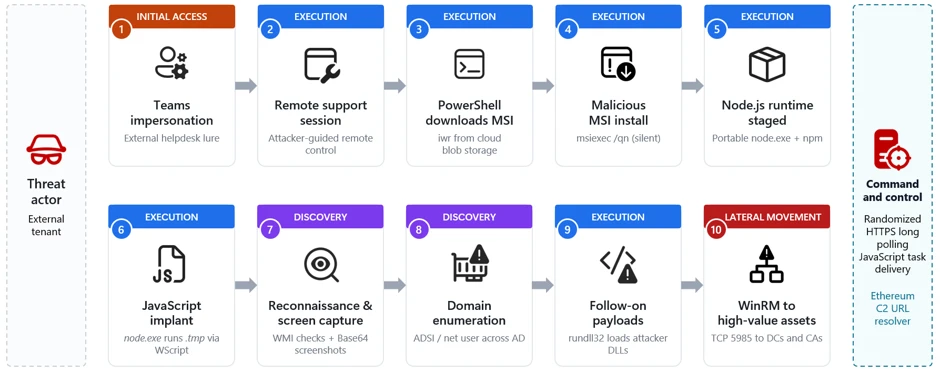
The JavaScript implant establishes command-and-control (C2) communication through randomized HTTPS polling and enables operators to execute commands remotely. The threat actor performs extensive host and Active Directory reconnaissance, including enumeration of domain users, servers, security products, and system information. The implant also periodically captures screenshots, providing visibility into the victim’s activity.
For follow-on execution, attackers abuse rundll32.exe to load malicious DLLs. After reconnaissance, the campaign progresses to lateral movement using Windows Remote Management (WinRM) over TCP port 5985. Targets include file servers, databases, application servers, domain controllers, and certificate authorities, indicating an effort to obtain broader enterprise control.
The campaign presents significant risk because it combines social engineering, legitimate remote-access software, trusted Windows binaries, credential-backed access, and native administrative protocols. The activity could ultimately facilitate data theft, privilege escalation, security-control evasion, extortion, or ransomware deployment.
Organizations should strengthen Teams external-access controls, educate users to verify unsolicited IT requests, restrict unauthorized remote-support tools, enforce phishing-resistant MFA and Conditional Access, monitor PowerShell/MSI/Node.js execution, restrict WinRM to authorized systems, and investigate affected hosts while rotating potentially exposed credentials.
Impact
- Unauthorized Access
- Credential Theft
- Privilege Escalation
- Lateral Movement
Indicators of Compromise
Domain Name
- update1n5.blob.core.windows.net
- update1n6.blob.core.windows.net
- update1n7.blob.core.windows.net
- update1n9.blob.core.windows.net
- updatetmp.blob.core.windows.net
- synctimes.australiaeast.cloudapp.azure.com
- webwether.eastus.cloudapp.azure.com
- dssdfvsdfvsdfvsdgbfbdvdzv.org
MD5
812b6efb21b9f69f17a926262bb1214c
935dd52b5d05881b4590323e1d10a1f6
a3dc207081d8c922eb4e2130306546cd
SHA-256
4cfdcae6dd1d6d98b870c8f0654d504f2bf10479a117dc297de789c249dc389d
a4d145a6347e47d40b3ca48af5c6dba01bf019d0110e31a44bb70fc77d1d1676
cc6d0f3f47afeba018173604e34f527e8413d3a54ffb35caed529bff49055ec5
SHA1
93c38b48b8f4e5c61549593374bef948a7cc3d8b
08672ef1a66447bd8005dddbe0d421a3d744d87a
19ef477c542b92ab6d63735bbedf4a657d6a3a12
Remediation
- Restrict Microsoft Teams external access to trusted organizations and domains.
- Train employees to verify unsolicited IT/helpdesk requests through known internal channels.
- Require phishing-resistant MFA and Conditional Access to reduce credential abuse.
- Restrict and monitor RMM and remote-support applications to approved tools only.
- Monitor and alert on suspicious PowerShell, WScript, cmd.exe, and msiexec activity.
- Block or restrict execution of downloaded MSI and script-based payloads using ASR policies.
- Monitor Node.js execution from user-writable directories such as LocalAppData.
- Detect suspicious persistence mechanisms, including Run keys and Startup-folder shortcuts.
- Monitor rundll32.exe for execution of unsigned or suspicious DLLs.
- Restrict WinRM (TCP 5985) to authorized administrative systems and management hosts.
- Alert on WinRM connections initiated by user-context or non-administrative processes.
- Enable Microsoft Defender network and web protection to block malicious infrastructure.
- Enable cloud-delivered protection for improved detection of emerging threats.
- Investigate compromised endpoints for C2 activity, persistence, credential exposure, and lateral movement.
- Rotate credentials accessible from compromised systems, prioritizing privileged and domain accounts.
- Segment critical infrastructure such as domain controllers and certificate authorities from regular user networks.