

Severity
High
Analysis Summary
A newly discovered data leak, dubbed "FortiBleed," has exposed what appears to be a massive collection of Fortinet and FortiGate VPN credentials associated with 73,932 firewall URLs across organizations worldwide. The leak was uncovered by security researcher, who found an exposed server containing usernames, email addresses, and plaintext passwords that appeared to provide access to Fortinet VPN devices.
The dataset reportedly includes organizations from a wide range of sectors, including major corporations such as Chevron, Samsung, Foxconn, Comcast, AT&T, Mercedes-Benz, and Toyota. Additional metadata within the leak included company revenue, industry classification, and employee counts, suggesting the information may have been used to prioritize targets for cyberattacks.
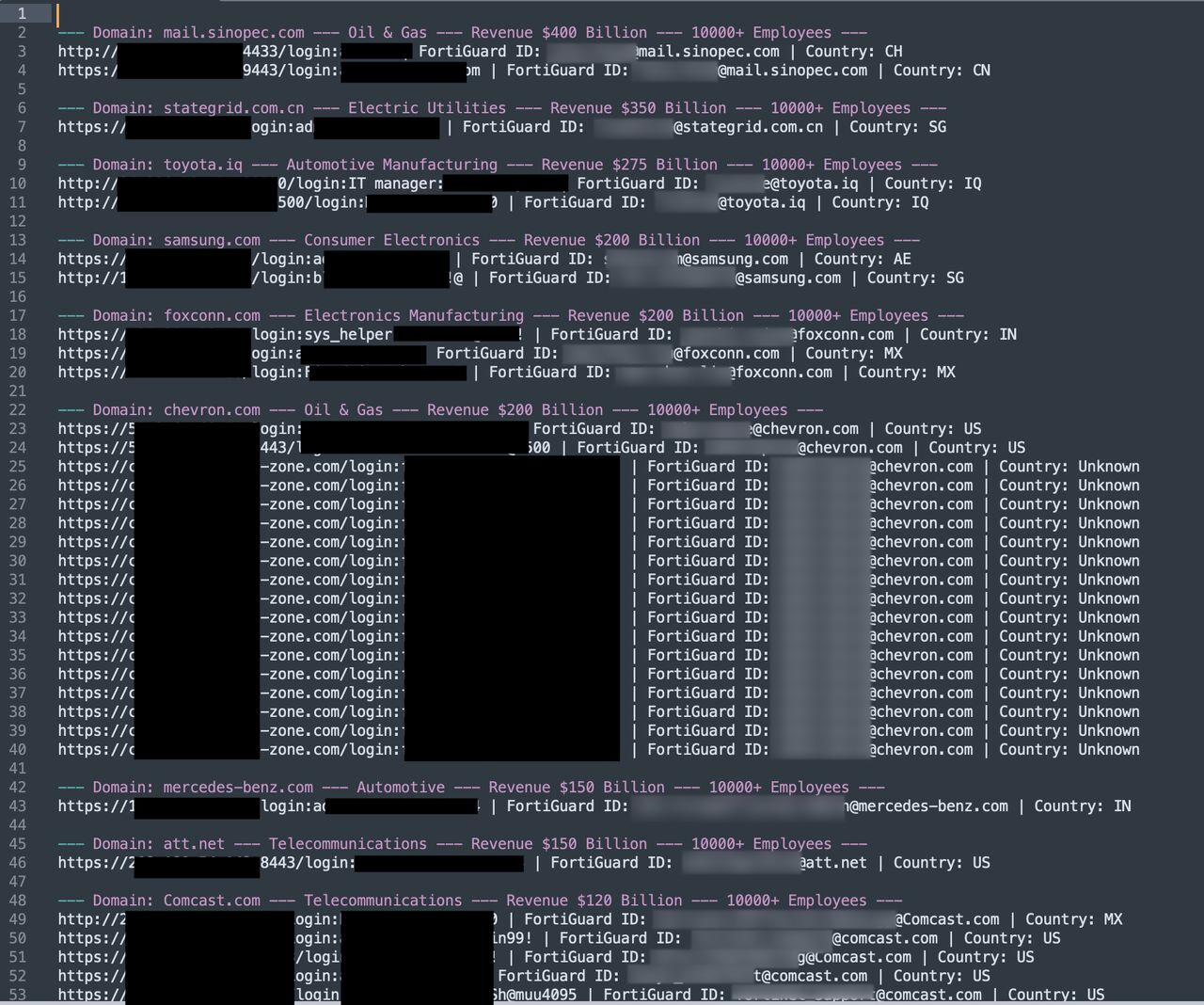
According to research, the credentials were collected through a large-scale campaign involving approximately 1.16 billion login attempts against 320,777 FortiGate devices and 2.1 billion attempts against 163,650 Microsoft SQL Server systems. Evidence found on the exposed server suggested a Russian-speaking threat group used intercepted SSL VPN authentication hashes, cracked them using a GPU-powered infrastructure, and leveraged recovered credentials to gain deeper access into victim networks.
Threat intelligence firm analyzed the dataset and described it as one of the largest known collections of compromised Fortinet-related credentials. The company reported that the leak affects organizations in 194 countries and spans nearly every major industry, with the highest concentrations of affected devices located in India, United States, Taiwan, Mexico, Turkey, and the United Arab Emirates.
Independent validation by cybersecurity researcher confirmed that portions of the credentials are authentic. His analysis suggests the data likely originated from exported Fortinet configuration files rather than a single recent breach. Many affected devices remain online and are running relatively recent FortiOS versions.
Despite the scale of the exposure, Fortinet stated that its investigation found no evidence of a new vulnerability or breach. The company believes the dataset is a compilation of credentials obtained from previous incidents and successful brute-force attacks. Organizations are advised to immediately rotate VPN and administrative passwords, enforce multi-factor authentication (MFA), review logs for suspicious activity, and monitor for compromised employee credentials.
Impact
- Unauthorized Access
- Credential Exposure
- Sensitive Information Disclosure
- Reputational Damage
Remediation
- Reset all FortiGate VPN and administrator passwords immediately to invalidate exposed credentials.
- Enforce Multi-Factor Authentication (MFA) on VPN and administrative accounts to prevent unauthorized access.
- Review FortiGate authentication and VPN logs for suspicious login attempts and unauthorized activity.
- Disable or remove unused accounts to reduce the attack surface.
- Rotate service account and privileged account credentials that may have been exposed.
- Verify administrator account configurations and remove any unauthorized accounts.
- Restrict management interface access to trusted IP addresses or internal networks only.
- Disable direct internet exposure of management interfaces whenever possible.
- Update FortiOS and related components to the latest supported versions.
- Review VPN user permissions and apply the principle of least privilege.
- Monitor for indicators of compromise (IOCs) associated with credential abuse and lateral movement.
- Audit Active Directory for suspicious account creation, privilege changes, or unusual logins.
- Check endpoint and server logs for evidence of post-compromise activity.
- Conduct a full credential hygiene review across connected systems and services.
- Implement account lockout and brute-force protection policies.
- Deploy continuous monitoring and alerting for VPN and administrative access events.
- Validate firewall and security appliance configurations against security best practices.
- Perform threat hunting activities to identify any persistence mechanisms left by attackers.
- Review and secure third-party remote access connections linked to affected devices.
- Develop or update incident response procedures and ensure readiness for potential compromise.