

Severity
High
Analysis Summary
A gear shaped icon is displayed for the apploication in an android device.
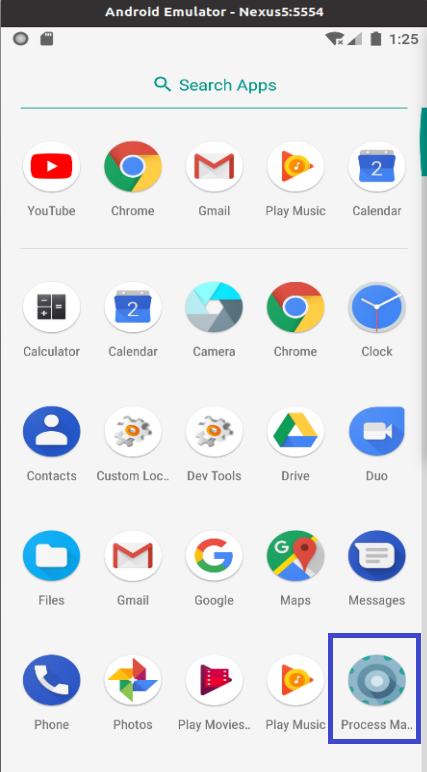
After execution, the “permission granted” warning appears on the screen. The process managers continues to run in the backgroud. The number of permissions requested by the application amounts to 18:
- ACCESS_COARSE_LOCATION – Access to the phone location.
- ACCESS_FINE_LOCATION – Access to the location based on GPS.
- ACCESS_NETWORK_STATE – View the status of all networks.
- ACCESS_WIFI_STATE – View WIFI information.
- CAMERA – Take pictures and videos from the camera
- FOREGROUND_SERVICE – Allows to put in foreground
- INTERNET – Allows to create internet sockets
- MODIFY_AUDIO_SETTINGS – Allows to modify audio settings
- REAL_CALL_LOG – Allows to read a telephone call
- READ_CONTACTS – Allows to read contacts information
- READ_EXTERNAL_STORAGE – Allows to read external storage devices
- WRITE_EXTERNAL_STORAGE – Allows to write to the Memory Card
- READ_PHONE_STATE – Allows to read phone status and its id
- READ_SMS – Allows to read SMS stored on the SIM card
- RECEIVE_BOOT_COMPLETED – Allows to start the app when the device is turned on
- RECORD_AUDIO – Access to the audio recorder
- SEND_SMS – Allows to send sms
- WAKE_LOG – Prevents the device from locking/hibernating
Impact
- Information Theft
- Performance Degradation
- Misuse of Data
- Financial Loss
Indicators of Compromise
- akankdev2017@gmail[.]com
IP
- 82[.]146[.]35[.]240
MD5
- 4f5617ec4668e3406f9bd82dfcf6df6b
SHA-256
- e0eacd72afe39de3b327a164f9c69a78c9c0f672d3ad202271772d816db4fad8
SHA-1
- 45eed0d3f6dc143bcfa19f593523ee07683ca66d
URL
- https[:]//videos-share-rozdhan[.]firebaseio[.]com/
- http[:]//ylink[.]cc/fqCV3
- http[:]//d3hdbjtb1686tn[.]cloudfront[.]net/gpsdk[.]html
- http[:]//da[.]anythinktech[.]com/
Remediation
- Use mobile phone EDR aka mobile endpoint detection and response.
- Use a reputable password manager app.
- Use Authenticator app (i.e., Google authenticator app, Microsoft authenticator app).
- For extra security, get a physical authenticator key like YubiKey, that can be used on the
- Phone and laptop.
- Switch to an uncommon but safe web browser.
- Do not use an outlook mail client or any email server that’s inbuilt on your OS. Switch to uncommon but reputable and secure email clients.
- Ensure that all your devices and logins are stored in your password manager and use the password generator
- Ensure all your logins are connected to your authenticator app/device.
- Your anti-virus software should be enabled to lock and erase your device if it’s stolen.
- Use Securedrop for document sharing, etc.
- Only open links from known and trusted contacts and sources when using your device.
- Make sure your device is updated with any relevant patches and upgrades.
- Avoid public and free Wi-Fi services (including hotels), especially when accessing sensitive information.
- Do not blindly approve app permission requests.
- Keep checking app permissions.